We are excited to announce the release of PowerSimm Editor 4.1. This new release of PowerSimm™ is a major upgrade from previous versions, involving significant improvements on the user interface functionality, menu contents and layouts, new validation rules for notifying users of errant inputs or configuration, and remediation of existing bugs. This new UI makes substantive strides to improve the software usability and error trapping of problematic data or configurations. PowerSimm 4.1 also incorporates, for the first time, a user interface for Credit Manager, our enhanced analysis tool for credit exposure.
A lot of valuable feedback from client users and our analysts went into the development of this new release. Our main goal was to provide users a more integrated and intuitive editing/execution environment. Diligent validation and QA testing were performed on this new release by experienced IT and Services analysts to ensure error-free functionality of various components.
Major highlights from the new version of PowerSimm™ are given below. More detailed lists of enhancements, new validation rules, and bug fixes are provided in Appendices 1 through 3 at the end.
Updated Look with a New Menu System – The main editor now features a leaner UI theme inspired by Windows 8 Metro where icons for the most commonly used editors are tiled in meaningful groupings. The menu system of PowerSimm™ has been significantly changed with this release. All previous menu functionality is still present, but has been organized in a more intuitive form.
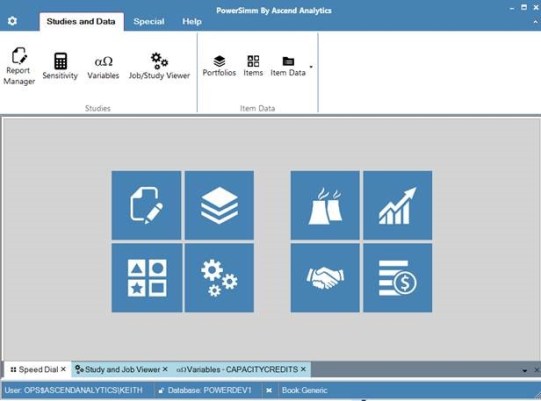
Tabbed Windows – In a form similar to web browsers but placed at the bottom of the frame, the newly-featured windows tabs allow the user to focus on, organize, and close work windows with more ease.

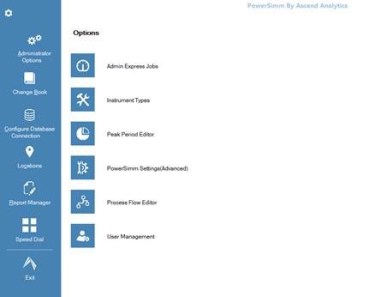
Backstage Menu – Also new in this version is what is termed a “backstage” menu section, accessible by clicking on the gear icon in the upper left corner of the main editor. The backstage menu hosts the configuration and administrative functions of the main editor.
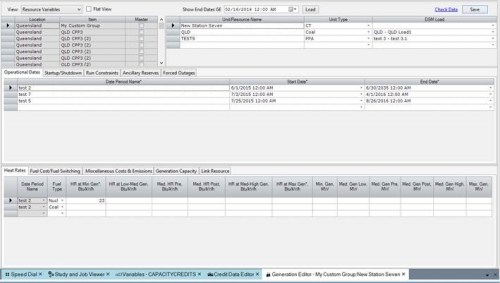
Completely Rebuilt Generation Editor – The generation editor was rebuilt to improve its usability by grouping the types of configuration data into several screens: Resource Variables, Scheduled Outages, and Historical Input. Additional features include an added end date filter, a more accessible flat view toggle, and additional validation rules, including new checks of heat rate, startup/shut down, and outage data.
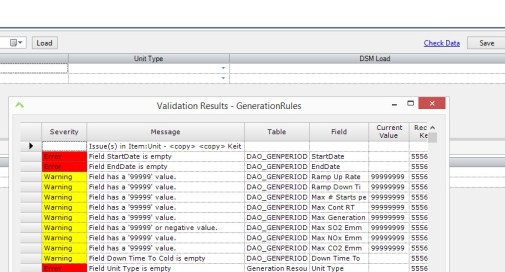
Many New Validation Rules – PowerSimm™ Editor version 4.1 adds many new input data validation checks to help prevent configuration errors in new or updated data. New and updated validation rules for the Generation Editor, Instrument Editor, Forward Curve Editor, and many more, improve the reliability of configurations and data. This includes more checks on generator configuration, trade details, load and pricing data, to name a few. Also, the new Report Manager has improved capability of preventing data- and configuration-related run failures. Building on the input data error checking process in version 4.0, the “Check Data” link allows users to check if their changes (additions or updates) have any issues before submitting the changes to the database.
User Interface Integration for Credit Manager – PowerSimm™ now features a user interface for Credit Manager, a credit risk analysis tool for collateral, exposure, and simulated potential future exposure across multiple departments.
Upgrading to PowerSimm™ 4.1 – This new version of PowerSimm™ will be available for installation on ATLAS. For all features to work, a database update is required. Please meet with your Ascend project manager for creating an update plan to review the new editor and develop a deployment testing schedule.
Appendix 1 – Enhancements
- Credit UI
- Using ribbon menus with new menu layout
- Updated icons
- Tabbed MDI windows
- Metro-style facelift to main form
- Added speed-dial
- Moved book indicator to status bar
- Permissions for study creation/deletion added
- Altered the report manager study list logic to exclude studies whose types do not have a showflag=1 condition
- Removed hiding the variable editor if there is an issue getting the data. The variable editor will open and display an exception instead.
- Made the following changes to the User Management screen –
- User List filtered to show only OPS users
- Ability to edit the user – role mapping
- Replaced the OPS username by Windows friendly name in the User List in the UI
- Ability to scroll and drag the tree nodes in Portfolio Editor
- Replaced Portfoliomanagement trigger with procedure to avoid missing column errors
- Added filter to Market price model, basis, wind, spot and Load editor to filter moduleprocess
- Added default variable functionality to startpowersimmstudy
- Added new sensitivity job tables and their trigger logic
- Added logic to automatically update the calculation order in case of missing values
- Jobidtable logging records application modifying the table
- Log machine running cost in the jobrunnerspectable_log
- Locations all default to 1 (world) in items
- Added and updated validation rules for:
- Generation Editor
- Instrument Editor
- Forward Curve Editor
- Main Model Editor
- Renewables Editor
- Load Editor
- Basis Editor
- Gas Storage Editor
- AscendHelp table updated and consolidated to POWERMAN
- Report manager has new validation rule selection capability
- Report Manager does not show CD studies in study lists
- ScheduleStudyToRun updated to include OPS parameters
- Spot Price Editor updated to be a “filter form” similar to load, wind, etc.
- Default time step of 4 set in Report Manager
- Job Error triggers consolidated and updated
- Portfolio Links now copy with portfolios when copied
- Study name duplicates prevented
- Instrument dates adjusted for hour ending. Dates entered in as dates (no times) are given a 1 AM time.
- Generation Editor rebuilt
- JOB_SENSITIVITYDATETABLE created and used
- Report Manager variable search is no longer case sensitive
- Basis editor date filter logic update
- Item name added to DSM dropdown in gen editor
- Archived variables filtered from variable editor
- Process flow drop-downs in various UIs filtered for context
- Deleted forward prices indicated in model editor
- Grids given export to excel function
- Sensitivity refresh button added to Report Manager
- Label changes in Generation Editor
- Calculation Order auto-populated in a better way from the variable editor
Appendix 2 – New Validation Checks
- Generation Editor
- Unit Type not null
- Non-negative times and costs
- Non-negative Ramp-up/Ramp-down rate
- Non-negative MMBTUs
- Non-negative emissions
- 0 <= Must Run
- Min <= Max Gen
- All three historical levels fields filled out (or none)
- Heat rate Gen’s are monotonically increasing
- Scheduled Outages: Start/End/% – all or none
- Set of Fuel Types must equal set of fuel types in HR tab
- Linked Res.: State must be filled if Unit is filled in
- Fuel Cost Multiplier must be > 0
- Instrument Editor
- Commodity needs to be filled out
- Instrument Type required
- Peak Period needs to be filled out
- one out of the 6 PRICE columns should be filled out for each record
- Warn on missing Quantity and/or Quantity type
- Transaction date cannot be null
- Forward Curve Editor
- Must have commodity filled out
- Multiple Commodity/Peak Period (PP) pairs are not allowed within a given item
- Use CD is checked, market name must be filled out
- If Use Adjustments is checked, make sure there are adjustments! (NOT USED!!! HIDE Adjustments tab and checkbox)
- If one column is filled out, then they all need to be (less Update Date)
- PP must match the parent
- Main Model Editor
- Description, Curve Type, Process Flow, Source & Weight Schema must all be filled out.
- Description should be unique (database change)
- Must be filled out: System Load, Gas %, Electric % (6 columns)
- Renewables Editor
- Expected Peak > Capacity –> Error
- TimeIntervalInHours * ExpectedPeakGen < ExpectedEnergy –> Error
- StartDate>EndDate –> Error
- Gaps –> Warning
- Overlaps –> Warning
- Load Editor
- Data type should be set (default to Energy)
- Load needs a value
- For a load, if forecasts are filled out, but no data, warn regarding setting the proper process flow.
- Total installed Cap = Sum of other cap
- Expected Peak Demand*[Hours in (End Date – Start Date)] > Expected Energy
- Of use column checked then fill out other columns
- Run orders exclusive
- Check if more than one record per load => Run order filled out
- Basis Editor
- Check for overlapping date ranges in the scaling data
- Check for date gaps in the scaling data
- Gas Storage Editor
- Check for overlap in Capacity date ranges
- Check for Utilization Min < Max
- Report Manager
- Warn on previous study resubmission
Appendix 3 – Bug Fixes
- Limited number of jobs shown in Study Viewer to 10,000 to prevent memory errors.
- Load, Hydro, Wind, FC editors, ST price, Weather handle database errors upon save.
- Fixed: Instrument Editor throws an error when there are zero instrument items
- Modified Ascendhelp table entries to point to latest value
- Modified AALOOKUPIDTABLE primary key from composite to single key, added foreign keys
- Added unique key to counterpartyratings table
- Fixed language errors in jobidtable triggers, made it schema independent and combined them into a single trigger
- Modified basis editor to point to newly created view to show archived forwardcurve values correctly
- Double-click of some item types (hydro, wind, FC, load) in portfolio editor opens form with item in focus
- User Management error when closing fixed
- Null active flags in instruments set to 0
- “copy” concatenation added for long item names
- Various credit database corrections (missing FKs and PKs)
- Extra line after paste issue fixed
- Credit date interval issue in Report Manager fixed
 The Volt
You must be logged in to post a comment.